Table of Contents
ToggleHome automation isn’t just for tech enthusiasts anymore, it’s practical, affordable, and increasingly standard in Birmingham homes. Whether you’re upgrading your existing space or building smart capabilities into a new property, understanding the fundamentals of home automation helps you make informed decisions about which systems work best for your household. This guide walks you through the essentials of setting up smart devices, choosing platforms that fit your needs, and tackling DIY installations confidently. No jargon overload, just straightforward advice from someone who’s done the work.
Key Takeaways
- Home automation Birmingham systems start with three core layers—smart devices, a hub or bridge, and a control app—working together to automate lighting, climate, security, and locks.
- Smart thermostats and lighting systems deliver the biggest impact on daily comfort and energy savings, with thermostats typically paying for themselves in one to two years in Birmingham’s humid climate.
- A reliable WiFi network or dedicated hub foundation is essential; upgrade to mesh WiFi if adding multiple devices, and ensure signal strength reaches at least -67 dBm where devices are located.
- Most smart devices can be installed as a DIY project by following manufacturer instructions, but complex HVAC systems, electrical rewiring, and structural work should be handled by licensed professionals.
- Start small with one or two priority devices like a smart lock or intelligent bulbs, then expand once you’re confident—and choose a platform (Alexa, Google Home, or HomeKit) that fits your privacy and convenience needs.
Understanding Home Automation Basics
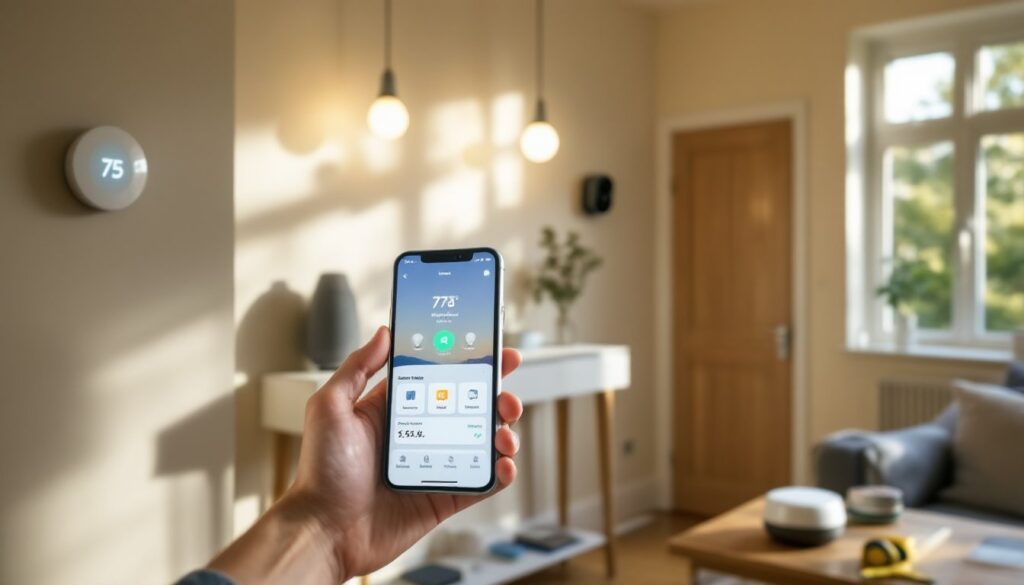
Home automation is simply using technology to control household systems remotely or automatically. At its core, you’re connecting devices, lights, thermostats, locks, cameras, to a central hub or app so they communicate with each other and respond to your commands or schedules.
The magic happens when these devices work together. Your motion sensor triggers the hallway light: your thermostat learns your schedule and adjusts temperature automatically: your door lock sends you a notification when someone enters. This isn’t science fiction, it’s standard stuff installed in thousands of Birmingham homes right now.
Before diving into products, understand the three layers:
- Smart Devices: The actual hardware (bulbs, switches, sensors) that perform tasks.
- Hub or Bridge: The central control point that lets devices communicate. Some systems work without a hub using WiFi or Bluetooth, but a hub often provides better reliability and range.
- App or Interface: Your way of controlling everything from your phone, tablet, or voice assistant.
The most common Birmingham setups mix protocols, WiFi for heavy-duty devices like thermostats, Zigbee for lights and sensors (lower power, excellent range), and Bluetooth for close-range items. Don’t panic if that sounds confusing: your hub handles the translation.
Essential Smart Devices for Birmingham Homes
Start small and expand. The smartest move is installing devices that actually solve problems in your daily life, not buying every gadget on the market.
Top priorities for most homeowners:
- Smart Thermostat: Learns your schedule, reduces energy waste, and lets you adjust temperature from anywhere. Brands like Ecobee and Nest work well in Birmingham’s climate. Installation is straightforward if you’re comfortable with basic wiring: otherwise, call an HVAC pro.
- Smart Lighting: Replace regular bulbs with Philips Hue, LIFX, or install Lutron switches. Lighting is one of the easiest entry points and makes an immediate impact on comfort and security.
- Smart Lock: A Yale SmartLock or Level Lock on your front door adds convenience and security. No rewiring needed, most install in under an hour.
- Security Cameras: Outdoor and indoor cameras like Logitech Circle or Wyze provide peace of mind. Mount them on eaves or corners for best coverage.
- Motion and Door Sensors: These trigger automation routines. A sensor in your living room can turn on lights when you enter: a door sensor alerts you if someone opens a window.
- Smart Speaker: An Amazon Echo, Google Home, or Apple HomePod serves as a voice control hub and can tie devices together.
Lighting and Climate Control Systems
These two systems deserve extra attention because they have the biggest impact on daily comfort and energy bills.
Smart Lighting starts with bulbs or switches. Smart bulbs (Philips Hue A19, LIFX Color A19) screw into existing fixtures, no rewiring. They cost $15–$40 per bulb but offer dimming, color, and scheduling. Smart switches (like Lutron Caseta) replace your existing wall switches and control any bulb in that fixture, making them cheaper per light if you have many bulbs in one room.
One key detail: check your current switch type. A 3-way switch (controlling one light from two locations) requires special wiring considerations. If you’re uncomfortable with electrical work, a licensed electrician should handle switch installation.
Climate Control through a smart thermostat saves real money. A Nest Learning Thermostat or Ecobee SmartThermostat typically pays for itself in one to two years through reduced heating and cooling. Installation requires turning off power at your breaker, removing your old thermostat, and connecting wires to the new unit. Match wire colors carefully, take a photo of your old setup before disconnecting anything. If you have a heat pump, radiant heating, or multi-stage system, verify compatibility online or call the manufacturer’s support line before purchasing.
Birmingham’s humid summers and mild winters mean your thermostat works overtime. A smart system that adjusts automatically when you’re away or asleep makes a tangible difference in comfort and cost.
Setting Up Your Smart Home Network
A solid home network is your foundation. WiFi-based devices need strong signal: Zigbee and Z-Wave devices need a hub with good placement.
WiFi Setup: Most smart devices connect to your home WiFi. If you’re adding a lot of devices, upgrade to a mesh WiFi system (like Eero or Netgear Orbi) rather than relying on your router alone. Mesh systems blanket your home with signal and handle more simultaneous connections without slowing down.
Place your WiFi router in a central, elevated location, avoid closets, cabinets, or near microwaves. If your Birmingham home is large or has thick walls, positioning matters. You want at least -67 dBm signal strength where your smart devices are located: weaker than that and you’ll see lag and disconnections.
Hub or Bridge: Some systems require a dedicated hub. SmartThings Hub, Hubitat, and Home Assistant are popular choices. A hub lets you create automation rules that work even if your internet goes down. If you go with WiFi-only devices (like some Wyze cameras or LIFX bulbs), you don’t need a hub, but you do lose local automation reliability.
Security: Use a strong WiFi password and enable WPA3 encryption if your router supports it. Change default passwords on your hub and any cloud accounts. Two-factor authentication on apps like Alexa or Google Home adds an extra layer. This matters, your smart locks and cameras are access points to your home.
Testing: Before installing everything, connect one device (a smart bulb is easiest) and confirm it works. This saves troubleshooting headaches later. If a device won’t connect, restart your router, check the WiFi password, and verify your phone is on the same network (many routers separate 2.4 GHz and 5 GHz bands, older devices may need 2.4 GHz).
Popular Home Automation Platforms and Systems
The platform you choose determines how devices talk to each other. Birmingham homeowners typically choose between three ecosystems.
Amazon Alexa dominates the market. It works with hundreds of brands, Philips Hue, Ecobee, Yale, Wyze, and more. An Echo Dot ($30–$50) or Echo Show ($100–$150) acts as your hub. Setup is simple: plug it in, say “Alexa, discover devices,” and it finds everything on your network. Routines let you set up automation (“Alexa, goodnight” dims lights and locks doors). The tradeoff: Amazon collects data on your usage, and you rely on Alexa servers being up. For most people, the convenience outweighs privacy concerns, but read Amazon’s privacy policy.
Google Home works similarly. Google Nest Hub devices run Google’s platform and integrate tightly with Google Workspace and YouTube. If you’re already in Google’s ecosystem, this feels natural. Device support is strong, though slightly less broad than Alexa.
Apple HomeKit emphasizes privacy, automation rules run on your Apple TV or HomePod mini (your local hub), not in Apple’s cloud. Setup is more involved, and compatible devices cost more, but you own your data. HomeKit is best if privacy and local control are priorities.
Most Birmingham homeowners start with Alexa because of cost, ease, and device variety. You can always add HomeKit devices later: ecosystems increasingly work together. Just avoid locking yourself into a single proprietary system with zero crossover compatibility, that rarely happens anymore, but read reviews.
DIY Installation Tips for Homeowners
You can install most smart devices yourself. Here’s how to do it right.
Before You Buy:
- Measure distances. WiFi devices need decent signal: Zigbee extends further but needs a hub.
- Check compatibility. A Philips Hue bulb won’t work without a Hue Bridge unless it’s a newer WiFi model. Verify before checkout.
- Read the manual. Seriously. Many frustrations come from skipping this step.
Smart Bulbs and Lights:
- Turn off power at the wall switch (or breaker for safety).
- Unscrew the old bulb: screw in the smart bulb hand-tight.
- Restore power and follow the app’s pairing process. Most take 2–3 minutes.
Smart Plugs:
- Plug the smart plug into an outlet.
- Download the device’s app.
- Connect to WiFi and name the device something logical (“living room lamp,” not “device 47”).
- Plug your device (lamp, coffee maker, fan) into the smart plug.
Smart Thermostat:
- Turn off power at your breaker.
- Remove your old thermostat and take a photo of wire connections.
- Carefully disconnect wires. Label them with masking tape if colors don’t match the new unit.
- Install the new thermostat’s mounting plate and connect wires to the corresponding terminals.
- Install the thermostat unit, turn power back on, and run setup on the app.
If you have heat pumps, multiple zones, or radiant heat, call a pro. These systems have quirks that trip up DIYers.
Smart Door Locks:
- Remove your interior lock escutcheon (faceplate).
- Remove the inside lock mechanism.
- Install the new lock body according to instructions, most take 15 minutes.
- Install batteries, connect to your WiFi or Bluetooth, and set user codes.
Tools You’ll Need:
- Screwdriver (Phillips and flathead)
- Tape measure
- Level (for camera mounting)
- Power drill (for mounting hardware)
- Labels and masking tape
Common Mistakes:
- Forgetting to turn off power before touching electrical devices.
- Connecting to the wrong WiFi network (check if your router broadcasts separate 2.4 GHz and 5 GHz bands).
- Mounting cameras too high or with glare from windows: test placement before securing permanently.
- Not acclimating devices. Smart devices with batteries should sit at room temperature for an hour before installing: extreme heat or cold affects performance initially.
When to Call a Pro:
- Thermostat installation on complex systems (heat pump, radiant, multi-zone).
- Electrical work beyond replacing bulbs or installing standard switches in normal conditions.
- Running Ethernet cables or installing network infrastructure if you’re unfamiliar with low-voltage wiring.
- Load-bearing wall work or running cables through walls (code requirements vary in Birmingham: check with your local building department).
A licensed electrician or home automation technician can handle trickier jobs. Most charge $100–$200 per hour in the Birmingham area: a complex install might run $500–$1500 total, but you’re paying for safety and compliance with local codes.
Conclusion
Home automation in Birmingham boils down to adding devices that genuinely improve your life, setting them up on a reliable network, and expanding thoughtfully. Start with one or two projects, a smart thermostat and lighting, perhaps, then add from there once you’re confident. Most installations take an afternoon and require nothing more than basic tools and patience. Research products on Tom’s Guide and Digital Trends before buying, and don’t hesitate to call a professional if you’re uncertain about electrical or structural work. Your Birmingham home will thank you with lower energy bills, better security, and the simple convenience of controlling everything from your phone.