Table of Contents
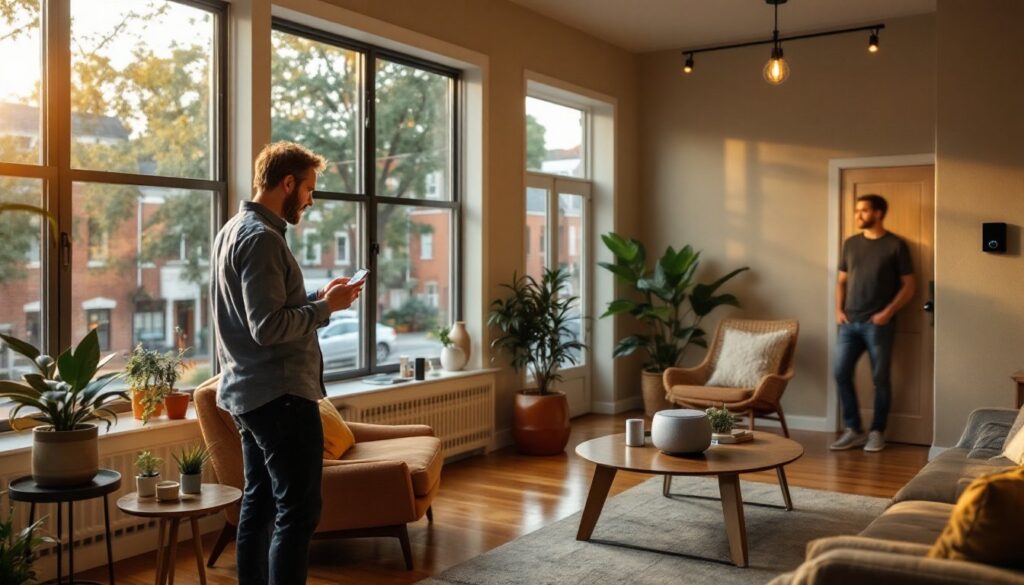
ToggleNashville homeowners are discovering that smart home technology isn’t just a luxury anymore, it’s become an affordable, practical way to boost comfort, security, and energy efficiency. Whether you’re looking to control your lights remotely, monitor your home while away, or automate your HVAC system, home automation in Nashville fits seamlessly into the region’s growing tech-forward culture. This guide walks you through the essentials: what systems matter most, when to DIY versus hire a pro, and which platforms work best in Tennessee’s climate and connectivity landscape.
Key Takeaways
- Home automation in Nashville is now affordable and practical, with basic setups starting under $300, making smart home technology accessible for most budgets.
- Smart thermostats and lighting systems offer the highest ROI for energy savings, potentially reducing HVAC costs by 10–15% annually in Nashville’s humid climate.
- DIY-friendly devices like smart bulbs and wireless cameras require no technical expertise, while thermostats and hardwired systems warrant professional installation to avoid costly mistakes.
- Choosing a central platform early—such as Apple HomeKit, Google Home, Amazon Alexa, or Zigbee/Z-Wave hubs—prevents fragmentation and ensures devices work seamlessly together.
- Nashville’s older homes benefit from wireless, battery-powered smart devices that avoid extensive rewiring, while mesh-based Zigbee and Z-Wave networks overcome WiFi dead zones common in homes with thick walls.
Why Nashville Homeowners Are Embracing Smart Home Technology
Nashville’s expanding tech presence, from Music City coding communities to growing corporate headquarters, has created a natural momentum around smart homes. More importantly, homeowners here face real, practical incentives: long, humid summers that push cooling costs, spring storms that highlight the value of remote monitoring, and increasingly affordable hardware options.
The appeal isn’t just about novelty. A Nashville homeowner running AC during a 95-degree July day saves measurable money with a programmable smart thermostat that learns habits and adjusts temperature schedules automatically. Security systems with local monitoring give peace of mind when you’re out of town during extended trips. Home automation solutions also integrate neatly with Nashville’s older homes, many built in the 1980s–2000s, where adding hardwired systems would require extensive rewiring, but wireless smart devices slip in without major renovation.
Beyond comfort and savings, there’s the lifestyle angle: controlling lights, music, or door locks from your phone feels genuinely useful when your hands are full or you’re running late. The cost barrier has also dropped: basic smart home setups now start under $300, making entry-level automation accessible for most budgets.
Essential Home Automation Systems to Install First
Start with the systems that deliver immediate, visible value. You don’t need to automate your entire home at once: build incrementally so you understand what works for your household.
Smart Lighting and Climate Control
These two systems offer the highest ROI in terms of comfort and energy savings. Smart lighting, via smart bulbs (Philips Hue, LIFX) or smart switches (Lutron Caseta, GE Enbrighten), lets you schedule lights, dim remotely, and set scenes for different moods or times of day. Bulbs are plug-and-play: switches require turning off power and swapping out existing hardware (fairly simple if you’re comfortable in an electrical box, but hire an electrician if you’re unsure).
For climate, a smart thermostat like Ecobee or Nest learns your heating and cooling patterns. Nashville’s humidity means your HVAC runs hard: a smart system that bumps the thermostat up by 2–3 degrees when you’re away or asleep can trim energy bills by 10–15% annually. Installation typically involves wiring into your existing HVAC’s control panel, usually doable for confident DIYers, but complex systems warrant a pro. Smart home thermostats and lighting solutions work best when paired with mobile apps and scheduling, turning your phone into a command center.
Security and Access Systems
Smart locks, cameras, and doorbell systems are second-priority installations and often the most visible security upgrade. A smart door lock (Level Lock, August) replaces your deadbolt mechanism or fits over it without removing the lock itself. Wireless video doorbells and security cameras let you see who’s at your door or monitor your property in real-time from Nashville or anywhere else.
Entry systems are typically wireless and battery-powered, requiring no rewiring. Many integrate with your phone and send alerts: some also sync with smart lights to turn on porch lights automatically when motion is detected. This is ideal for Nashville’s evening weather, deterring package theft and porch activity during dark hours. If you want professional monitoring (24/7 response to alarms), consider hardwired systems or professional monitoring subscriptions, which require a technician but offer peace of mind.
DIY vs. Professional Installation: What Works Best in Nashville
Smart bulbs, plugs, and wireless sensors are almost always DIY-friendly. You screw in a bulb, download an app, and connect to WiFi. No tools, no wiring, no expertise required. Even renters can use these without landlord concerns.
Smart thermostats and light switches sit in a gray zone. If your current thermostat is a simple two-wire or three-wire setup, swapping it out is a 15-minute task, identify wires, take a photo, turn off power, disconnect old unit, and connect new leads to the same terminals. But if your HVAC has a complex setup (heat pump, auxiliary heating, or humidifier integration), mismatched wiring can damage equipment or fail to heat/cool properly. When in doubt, a licensed HVAC technician costs $150–$300 and prevents expensive mistakes.
Light switches follow the same logic. Replacing a standard switch with a smart Lutron Caseta or similar is simple for anyone comfortable turning off a breaker and wiring (black, white, ground). But, if you’re unfamiliar with electrical work, hire an electrician rather than risking shock or fire hazard.
Smart locks and cameras are typically DIY-friendly because they’re wireless and battery-powered. Mounting a video doorbell takes a drill and screwdriver: programming is app-based. Some older doors or weatherproofing details might complicate installation, but most Nashville homes accommodate standard hardware easily.
Hardwired security systems, structured cabling, or integration with existing alarms warrant professional installation. Nashville’s humidity and older home construction sometimes require weatherproofing or conduit work that’s best left to licensed installers. Permits also apply if you’re integrating professionally monitored alarms. A local home automation technician can assess your home’s specific needs and handle the work correctly.
Choosing the Right Home Automation Platform for Your Needs
Platform fragmentation is the biggest headache in home automation. Not all devices play well together, so choosing a central hub or standard early prevents frustration later.
Wi-Fi-only systems (like individual Philips Hue bulbs or Wyze cameras) work without a hub but suffer from WiFi congestion and can drop connection in homes with poor coverage. Nashville’s older homes with thick walls and multiple floors can create dead zones, so WiFi-only works best if your broadband is strong and well-distributed.
Hub-based systems (like Apple HomeKit, Google Home, or Amazon Alexa) use a central device to manage Wi-Fi and Bluetooth connections, reducing dropouts and allowing automation even when WiFi is laggy. Apple HomeKit emphasizes privacy: Google and Alexa offer broader device compatibility and more integrations. Choose based on what devices you already own and trust. Choosing the right automation platform is a decision that pays dividends in reliability and ease of use.
Zigbee and Z-Wave networks are mesh-based standards that create a self-healing network where each device relays signals to others, providing excellent range and reliability, especially useful in larger Nashville homes. These require a compatible hub (SmartThings, Hubitat, or Aeotec) and steeper initial cost, but they’re bulletproof for reliability.
Consider your climate control and security devices first when choosing a platform. A smart thermostat and door lock should be your anchor: pick a platform that supports both seamlessly, then add lights and cameras that work within the same ecosystem. This prevents the scenario where your thermostat runs on one app, your lights on another, and your cameras on a third.
Conclusion
Home automation in Nashville is practical, not pretentious. Start with smart thermostats and lighting to cut energy costs and boost comfort, then add security cameras and smart locks for peace of mind. DIY the wireless, battery-powered stuff: hire a pro for hardwired systems or complex integrations. Pick a platform early, Apple, Google, Alexa, or a Zigbee/Z-Wave hub, and build from there. Your smart home will only get smarter and more valuable as Nashville’s tech ecosystem grows.